3.1. Prepare bootable USB, floppy (startup disk)  

Active@ KillDisk operates from the USB / floppy drive in a Microsoft DOS environment. For hard drives on PCs with operating systems other than DOS or Windows, you must create a DOS-bootable USB / floppy on a DOS or Windows machine and use it on your alternate-OS machine.

If you have a bootable USB / floppy, skip to the Copy Active@ KillDisk section, below.

To prepare a bootable USB / floppy from MS-DOS, Windows 95/98/ME/XP, put a USB / floppy in the USB / floppy drive (a:) and follow the appropriate instructions below:

  • From MS-DOS or in Command Prompt mode of Windows 95/98:
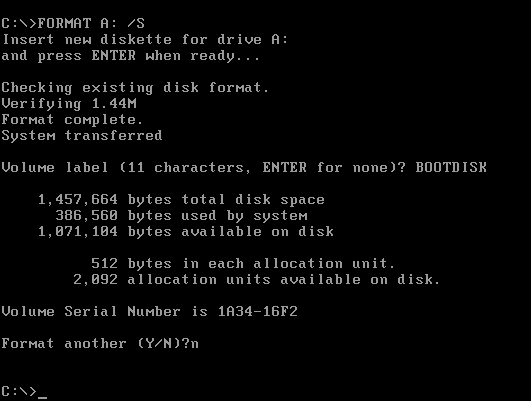
    • On the screen, type the format command as follows (see Figure 3-1):
      FORMAT A: /S
  • Follow on-screen messages until process is complete

Figure 3-1: DOS Format Progress Messages
Hard Drive Eraser.Procedure
  • From the Windows 95/98/ME screen:
    • Click the Start button and click Settings, Control Panel.
    • From the Control Panel screen, click Add/Remove Programs.
    • In the Add/Remove Programs screen, click the Startup Disk tab.
    • Click the Startup Disk... button and follow the screen instructions until the process is complete.

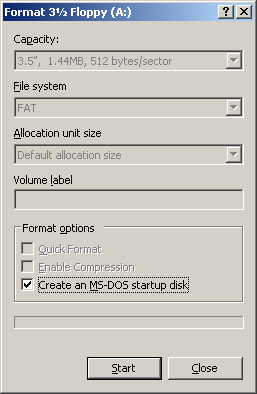
Figure 3-2: Windows Format Startup Disk Screen
Windows Format Startup Disk Screen
  • From the Windows XP screen:
    • Right-click A: drive.
    • From the drop-down menu, click Format...
    • Enable the checkbox beside Create an MS-DOS startup disk.
    • Click the Start button and follow the screen instructions until the process is complete.

3.1.1. Copy Active@ KillDisk  

  • Copy Active@ KillDisk file (KILLDISK.EXE) to the bootable USB / floppy disk or startup disk in drive A:
  • If you don't have the Active@ KillDisk file, download it from http://www.killdisk.com
  • After copying the file onto the USB / floppy, remove it from the USB / floppy drive

3.1.2. Label the Disk  

Active@ KillDisk can be used two ways:

  • DOS Interactive mode
  • Command Line mode

If you plan to use Active@ KillDisk in DOS Interactive mode, label the disk as follows:

  • Active@ KillDisk
  • Data Eraser Utility

If you plan to use Active@ KillDisk in Command Line mode, please skip the next section and read Boot to DOS (Command Line Mode).

Once preparation of the bootable 3.5-inch USB / floppy disk is complete, you are ready to begin removing data.

Open Contents

  1. Product Overview
    1. Erasing Confidential Data
      1. Advanced Data Recovery Systems
      2. International Standards in Data Removal
    2. Wiping Confidential Data from Unoccupied Drive Space
      1. Wiping NTFS
      2. Wipe FAT
      3. Wipe HFS+
      4. Wiping Ext2fs/Ext3fs/Ext4fs
  2. System Requirements for DOS and Windows versions
    1. Personal Computer
    2. Drive Storage System
    3. Other Requirements
    4. Active@ KillDisk for Hard Drives Version
  3. Running Active@ KillDisk for DOS
    1. Preparing a DOS-Bootable floppy,USB
      1. System Formatting
      2. Copying Active@ KillDisk to a floppy, USB
      3. One-Step Method
    2. Preparing a Bootable CD
    3. Modes of Operation
      1. Interactive Mode
        1. Erase Data from a Device
        2. Wiping the Data
      2. DOS Command Line Mode
      3. Autoexecute Mode
    4. Erasing or Wiping Logical Drives (Partitions)
    5. Erase Operation Complete
  4. Running Active@ KillDisk for Windows
    1. Active@ Boot Disk Creator
    2. Modes of Operation
    3. Command Line Mode
    4. Erasing or Wiping Logical Drives (Partitions)
    5. Erase Data from a Logical Drive
    6. Wipe Data from a Logical Drive
    7. Erase or Wipe Operation Complete
  5. Common Questions
    1. How does the licensing work?
    2. How is the data erased?
    3. What is the difference between the Site and Enterprise license?
    4. Which operating systems are supported by Active@ KillDisk?
    5. Is Active@ KillDisk compatible with Macintosh computers?
    6. What to do if I cannot boot from a floppy (USB)?
    7. Will I be able to use my Hard Disk Drive after Active@ KillDisk erase operation?
  6. Descriptions of Erase/Wipe Parameters
    1. Erase/Wipe Methods
      1. One Pass Zeros or One Pass Random
      2. User Defined
      3. US DoD 5220.22-M
      4. US DoD 5220.22-M (ECE)
      5. German VSITR
      6. Russian GOST p50739-95
      7. Canadian OPS-II
      8. HMG IS5 Baseline
      9. HMG IS5 Enhanced
      10. US Army AR380-19
      11. US Air Force 5020
      12. Navso P-5329-26 RL
      13. Navso P-5329-26 MFM
      14. NCSC-TG-025
      15. Bruce Schneier
      16. Gutmann
    2. Other Parameters
      1. Verification
      2. Retry Attempts
      3. Ignore Errors
      4. Clear Log File before Start
      5. Skip Confirmation
      6. Wipe out Deleted/Unused data
    3. Glossary of Terms
 

This document is available in PDF format, which requires Adobe® Acrobat® Reader (Free download):

hard disk eraser

USER'S GUIDE
(for DOS)

Size: 494 KB

killdisk hard disk eraser

USER'S GUIDE
(for Windows)

Size: 1,44 MB

hard disk eraser note

KillDisk Datasheet
Size: 242 KB